Kickstart Your Journey with Amazon Sponsored Ads: A Beginner’s Blueprint

Discover how to use Amazon’s ad platform effectively to grow your brand.

Growing your Brand on Amazon requires a multi-pronged advertising approach that engages shoppers at each stage of their non-linear journey.

Leveraging a strategic mix of Amazon Advertising Sponsored Ad solutions can drive your products' awareness, consideration, purchase, and loyalty. This guide explains how to choose the right tactics and measure success.

1. Setting the Stage: Defining Goals for Amazon Ad Success

A strong advertising strategy starts with well-defined goals. On Amazon, your objectives will likely include:

Capturing Attention: Initiating Brand Awareness

Awareness campaigns aim to generate interest in your Brand and products among new audiences. Success metrics include:

Key Awareness Campaign Metrics

  • Impressions: How many times your ad was displayed
  • Viewable Impressions: Impressions displayed on screen for over one second

Key Awareness Brand Metrics

  • Branded Searches: Searches for your brand terms that didn’t lead to engagement. See Brand Analytics provides powerful insights to optimize your advertising strategy.

Example: A dog food brand runs a Sponsored Display to engage relevant lifestyle audiences and then measures impressions to gauge brand exposure.

Engaging Potential Customers: Deepening Consideration

Consideration campaigns entice browsers to explore your offerings more deeply.

Key Consideration Campaign Metrics

  • Clicks: Number of ad clicks
  • Click-Thru Rate: Ratio of clicks to impressions
  • Detail Page Views: Product page views, including organic traffic

Key Consideration Brand Metrics

From your Brand Metrics, measure changes in:

  • Detail Page View Only
  • Brand Searches and Detail Page Views
  • Add to Cart

Example: Snack brand runs Sponsored Brand keyword-targeted campaigns promoting products to category browsers. They measure clicks and detail page views.

Sealing the Deal: Driving Purchases on Amazon

Purchase campaigns aim to convert interested shoppers. Focus on:

Key Purchase Campaign Metrics

  • Total Sales: Revenue generated
  • ROAS: Total sales divided by ad spend

Key Purchase Brand Metrics

  • Brand Customers: Unique purchasers
  • Top 10% Customers: Your most loyal buyers

Example: A hair care brand runs Sponsored Products, retargeting shoppers who view products but don’t buy. They optimize based on sales and ROAS. See Data-Driven Amazon TACoS Insights.

Cultivating Brand Loyalty Through Targeted Ads

Loyalty campaigns nurture repeat purchases and brand advocacy via:

Key Loyalty Metrics

  • Subscribe & Save signups
  • Brand Follows

Example: A CPG brand runs posts with brand-follow prompts that offer deals and exclusive content. They measure engagement and follower growth.

For metrics and reporting opportunities, see Automating your Amazon advertising data and The Best Amazon Advertising Tools For Sellers & Vendors.

Decoding the Shopper’s Path: A Guide to Non-Linear Journeys

Shoppers interact with brands in various sequences as they move between stages.

Reaching shoppers across this complex flow requires showing up where they are with relevant messaging. Awareness and consideration touchpoints are especially crucial to growing your audience.

Selecting Optimal Ad Solutions for Maximum Impact

Amazon’s suite of ad solutions supports your objectives:

  • Stores: A dedicated brand destination to immerse shoppers in your story and products
  • Sponsored Brands: Keyword-targeted ads promoting your Brand and products in search results
  • Sponsored Display: Product and interest-targeted display ads on and off Amazon
  • Sponsored Products: Keyword and product-targeted ads in shopping results
  • Posts: Shoppable brand-building content that appears in feeds and product pages
  • Brand Follow: Lets shoppers follow your Brand and get notifications about deals, products, and Posts
  • Brand Metrics: Measurement tool showing how your Brand stacks up in your category

How to select and optimize keywords for your ad campaigns

Keyword targeting matches your ads to shopping queries shoppers use when searching on Amazon.

Automatic vs Manual Targeting

Automatic targeting for Sponsored Products allows Amazon to select keywords for you based on product information. Manual targeting for sponsored products and brands lets you choose keywords and bids.

When to Use Automatic Targeting

  • Launching a new campaign
  • Wanting to leverage Amazon algorithms to find new opportunities

When to Use Manual Targeting

  • Have proven keywords to allocate more aggressive bids
  • Want control over keyword-level optimizations

Keyword Mastery: Targeting the Right Terms in Amazon Sponsored Ads

Match types refine how shopping queries can trigger your keyword-targeted ads:

  • Broad Match: Queries can contain keywords in any order with other terms. Use for discovering opportunities.
  • Phrase Match: Queries must contain the exact keyword or close variants in the same order but can include other terms before/after. Use for more relevant traffic.
  • Exact Match: Queries must match the keyword exactly or very closely with no additional terms. Use for most relevant traffic.
  • Negative Match: Queries matching the negative keyword exactly or closely will not show an ad. Use this to avoid irrelevant traffic and wasted spending.

Choosing Keywords

  • Broad Match Example: A beverage brand used a broad match for the “healthy drink” keyword in a new product campaign, uncovering relevant longtail variations like “fruit drink healthy” and “fizzy drink healthy.” This drove sales and revealed new marketing angles.
  • Negative Match Example: An eyeglass brand selling only 50 TVs added “60-inch TV” as a negative phrase match to avoid impressions and clicks from shoppers wanting larger sizes it doesn’t carry.

Targeting Tactics: How to Promote Your Products Effectively on Amazon

Product targeting lets you promote your products on related product detail pages and category-level shopping results.

  • Targeting by Category: Choose relevant categories to show your ads. Then, further refined by Brand, price range, star rating, or other criteria shoppers use. Ex: A running shoes brand could target the “men’s running shoes” category, then refine it to similar brands and price points.
  • Targeting by ASIN: Select individual products to show your ad by searching for or uploading ASINs. Choose complementary or competitive products to engage high-potential audiences. Ex: The shoe brand could target product pages of competing or accessory product ASINs.
  • Using Negative Product Targeting: Keep your ads from showing on specific product pages or categories that need to meet performance goals. Ex: The shoe brand could exclude unrelated products in targeted categories, like shoe horns.

Implementing Product Targeting: A Step-by-Step Guide for Amazon Sellers

When creating your campaign, select “Product Targeting” rather than “Keyword Targeting.” Then, follow the prompts to choose categories and ASINs.

Here is an example of an electronics brand selling a new digital camera;

1. Target broad “Electronics” and “Camera & Photo” categories to reach engaged shoppers

2. Narrow targeting to the “Digital Cameras” sub-category

3. Exclude irrelevant products like camera cases with negative ASIN targeting

Strategic Bidding: Optimizing Your Amazon Ad Spend for Best Results

Fine-tuning your keyword and product targeting is just one piece of the puzzle. To get the most out of your sponsored ads, you also need to dial in your bidding and budgeting approach.

Combining Keyword and Product Targeting

We recommend using keyword and product targeting together for Sponsored Products to maximize your reach and relevance. Sellers can use both in the same campaign but in different ad groups. Vendors are limited to one targeting type per campaign. Don’t worry about bidding against yourself — the system accounts for this.

Precision Bidding: How to Adjust Your Bids for Optimal Ad Placement

The “Adjust Bids by Placement” feature for Sponsored Products lets you bid more aggressively for specific ad placements:

  • Top of Search (First Page): The premium placement at the top of the first search results page. Use a higher bid adjustment (e.g., +50–100%) to win this spot.
  • Product Pages: Your ads on product detail pages and add-to-cart pages. Modest bid adjustment (e.g., +25%) can help you stay competitive.
  • Rest of Search: All other search result placements. Your base bid applies here.

Your bid adjustments stack on top of your base bid and bidding strategy. For example, a $1.00 base bid with 50% top-of-search adjustment and dynamic bidding down would only have a $1.50 max bid for top-of-search but may reduce bids for other placements based on conversion likelihood.

Selecting Effective Bidding Strategies for Amazon Ads

Sponsored Products offers dynamic bidding and fixed bidding options:

  • Dynamic Bids — Down Only: Amazon may reduce your bid for placements less likely to convert, never exceeding your base bid.
  • Dynamic Bids — Up and Down: Amazon may increase your bid to 100% for top-converting placements and reduce it for low-converting placements.
  • Fixed Bids: Your exact bid is used regardless of placement.

If your goal is to drive volume efficiently, dynamic bidding can help stretch your budget further. To focus on specific placements, use fixed bids with bid adjustments.

Sponsored brand ads have two bidding choices:

  • Automated Bidding: Allows Amazon to automatically adjust bids below your max bid to optimize for your target ACoS.
  • Custom Bid Adjustments: You can increase or decrease bids up to 99% for placements below the top of the search. Your base bid is used to top the search.

Budgeting for Success: Managing Your Amazon Ad Budget

Set your campaign budgets high enough to keep your ads showing throughout the day. If you’re consistently hitting your daily budget early, raise it by 10–20% until you’re no longer limited by budget to maximize visibility.

By combining keyword and product targeting, choosing the right bidding strategies, and setting competitive bids and budgets, you can ensure your sponsored ads work as hard as possible to grow your Brand on Amazon. Monitor performance and adjust as needed to hit your brand and efficiency goals.

Preparing Your Products for the Spotlight: Retail Readiness

Ensuring your products are retail-ready before launching any Amazon advertising campaign is critical. Retail readiness means your product detail pages include all the information a customer needs to make a purchase, such as:

  • Clear, high-quality images
  • Descriptive title and bullet points
  • Relevant keywords in the listing copy
  • Competitive price
  • Ample inventory
  • Product reviews

The Importance of Retail Readiness: Ensuring Your Products Stand Out

Understanding the non-linear shopper journey is key to effective advertising. Reaching shoppers across this complex flow requires showing up where they are with relevant messaging. Awareness and consideration touchpoints are especially crucial to growing your audience.

Driving shoppers to an incomplete or uncompelling product page is a fast way to save ad spend. Retail-ready pages ensure potential customers can easily find the information they need to convert.

Amazon customers rely heavily on product content when making purchase decisions online. A detail page is the digital equivalent of your in-store packaging and salesperson. It must answer critical questions, overcome objections, and convince shoppers yours is the best product for them.

Additionally, retail readiness impacts your ad performance. Amazon’s algorithms consider your click-through rates, detail page views, and conversion rates in determining your ad placements. Relevant, engaging pages with strong sales history get more impression share.

Deciphering Amazon’s Retail Terms: A Quick Guide

Let’s review a few key terms related to retail readiness on Amazon:

  • Product Detail Page: This is the page on Amazon where customers land after clicking your ad. It contains all product information, including titles, images, bullet points, descriptions, prices, and reviews.
  • ASIN: Amazon Standard Identification Number, Amazon’s unique SKU for each product variation. Each ASIN has its detail page. Variations of a product like size and color are called “child ASINs” and roll up to a “parent ASIN.”
  • Featured Offer: The purchase offer featured on a product detail page is determined by price, shipping speed, and seller rating. Customers who click “Add to Cart” or “Buy Now” purchase from the featured offer by default.

The Power of Product Detail Pages: Why They Matter

Mastering the art of product detail page optimization is essential for any online retailer. By focusing on clarity, interactivity, and customer engagement, brands can significantly enhance their online presence and sales potential.

A well-optimized product detail page enhances user experience and serves as crucial virtual shelf space for your Brand. See Amazon Sellers and Vendors: Building Brand Loyalty for more on creating compelling product pages.

Here’s how to optimize your product pages for visibility and conversion.

The Significance of Product Detail Pages

A product detail page is where your customers decide to purchase. It acts as the point of sale online, much like a physical checkout counter. This page must provide essential product information and facilitate a smooth and convincing purchase process. It is a brand’s opportunity to differentiate itself by clearly and attractively presenting its products.

Key Components of a Product Detail Page

To mimic the effectiveness of in-store merchandising, every detail on the page should be thoughtfully curated. Here are the main elements to focus on:

  1. Title and Description: These should be clear and concise, providing all necessary details, such as size, color, and compatibility.
  2. Images and Videos: Using high-quality images and videos that accurately represent the product is crucial. Include multiple views and a ‘what’s in the box’ image to reassure customers of their purchase.
  3. Customer Reviews and Ratings: To build trust and encourage sales, aim for a high number of reviews and a rating of at least 3.5 stars.
  4. Inventory and Pricing: Ensure your products are competitively priced in stock to prevent cart abandonment.

Assessing Your Retail Readiness

To check if your products are retail-ready, evaluate your detail pages:

  • Do your titles, bullets, and descriptions include relevant search keywords?
  • Are your images clear, informative, and high quality?
  • Have you filled out all attributes completely with accurate, helpful information?
  • Are you priced competitively after considering shipping?
  • Do you have enough inventory in stock?
  • Are you winning the featured offer regularly?
  • Do you have product reviews and a star rating?

Optimizing for Retail Readiness

If your pages don’t meet retail readiness criteria, prioritize the following actions:

  1. Upgrade your image quality and add more relevant photos/videos
  2. Revise your product title and bullets to include top keywords
  3. Expand your product description, answering key customer questions
  4. Review pricing — can you offer a more competitive price or shipping options?
  5. Increase your available inventory
  6. Encourage reviews via product inserts or follow-up emails

Remember, your product detail page is your best sales tool on Amazon. Optimizing it will result in higher conversion rates, better ad performance, and, ultimately, more sales. By ensuring retail readiness, you set your sponsored ads campaigns up for success before they even begin.

Optimizing Product Pages for Better Performance

  • Ensure high-resolution images that meet platform guidelines, such as a pure white background and product filling 80–100% of the image frame.
  • Include detailed, concise product descriptions that highlight key features.

Enhancing Product Visibility

  • Use A+ content for a richer presentation, including videos and comparison charts.
  • For sellers enrolled in Amazon’s Brand Registry, utilize Enhanced Brand Content (EBC) for added customization and branding.

Leveraging Promotions

  • Implement promotional strategies such as Lightning Deals or Subscribe & Save to boost visibility and encourage purchases.
  • Combine promotions with Amazon PPC campaigns to drive significant traffic to your product pages.

Each element — from compelling visuals to strategic promotions — is crucial in converting potential buyers into loyal customers. Creating and optimizing each product page meticulously is essential for success in digital retail environments.

Leveraging Brand Metrics to Uncover Growth Opportunities

Ads and Brand Metrics help you benchmark your performance against competitors and identify areas for improvement.

Assessing Performance vs. Competitors

See how your Brand compares in key metrics like awareness, consideration, and conversion. Look for areas where you lag to focus on.

Measuring Return on Engagement

Brand Metrics shows the estimated ROI from shoppers engaging with your Brand over the past 12 months. Use this to gauge the quality of your audiences.

Making Strategic Campaign Decisions

Based on your goals and insights, craft campaigns to move shoppers down the funnel:

  • Awareness Strategies: Introduce your Brand using Sponsored Brands and Sponsored Display. Lifestyle imagery and category keywords help attract relevant new audiences.
  • Consideration Strategies: In sponsored products and store content, feature specific product benefits and unique selling points. Use detailed page traffic and purchase rate to see what resonates.
  • Purchase Strategies: With sponsored displays, retarget high-intent audiences like past brand shoppers, product viewers, and competitors’ customers. Promote seasonal deals and best sellers.

Becoming a Data-Driven Advertiser on Amazon

Sponsored ads are essential tools for growing your business on Amazon. By aligning your tactics with your objectives, engaging shoppers across the journey, and leveraging data, you can craft campaigns that build your Brand and bottom line.

Maximizing your campaigns requires timely, unified reporting to surface trends and optimization opportunities, especially when looking at off-Amazon performance. For example, using Amazon Attribution to understand how your non-Amazon marketing tactics contribute to shopping engagement and sales. Attribution insights can help you optimize campaigns to drive more efficient growth. See Why Amazon Attribution reporting data supercharges insights.

Challenges of Manual Reporting: Navigating the Data Jungle

Accessing your campaign and brand data often requires logging in to Seller Central or Vendor Central to manually download spreadsheets and stitch them together. This is tedious and delays insights.

Advantages of Automated Reporting: Streamlining Your Amazon Ad Insights

Connecting your Amazon data with an automated solution like Openbridge enables you to automate the metrics flow to a dashboard or data warehouse. Unifying data speeds up time to insight and eases reporting.

Additional Amazon Advertising Resources

To dive deeper into Amazon advertising strategies, reporting, and optimization best practices, check out these additional resources:

Whether you’re just starting with Amazon advertising or looking to take your sponsored ads strategy to the next level, it’s key to have a solid foundation in the available solutions, targeting options, retail readiness best practices, and reporting capabilities.

Combining the right advertising tactics with an in-depth understanding of your shoppers and a data-driven optimization approach can unlock the full potential of Amazon’s powerful sponsored ads platform to grow awareness, consideration, conversion, and loyalty for your brand. Explore the linked resources to expand your Amazon advertising expertise.

Kickstarting Your Journey with Amazon Ad Data Automation: 30-day Free Trial

Accelerate your growth marketing by automating reporting with Openbridge.

Our solution connects all your Amazon Ads data to visualization tools like Tableau and data warehouses like Snowflake for unified insights that power more intelligent optimizations.

>> Start a 30-day free trial to see the impact of Amazon Ads data automation for yourself. <<


Kickstart Your Journey with Amazon Sponsored Ads: A Beginner’s Blueprint was originally published in Openbridge on Medium, where people are continuing the conversation by highlighting and responding to this story.


from Openbridge - Medium https://ift.tt/cr2tjxL
via Openbridge

Power of Tags in Amazon Stores: Key To External Marketing Performance Insights

Using Store tags delivers insights to optimize traffic driving marketing and advertising media investments.

Source tags in Amazon Stores are potent tools that offer a robust mechanism for tracking traffic sources and analyzing campaign effectiveness.

These tags are not just a tracking tool but a strategic asset that can significantly enhance your understanding of marketing effectiveness.

If you are a pro and use Amazon Store tags but want deeper, more sophisticated tagging strategies and tools, check out our post “Hacking Your Amazon Brand Store Tagging Strategy.” You can achieve powerful campaigns, offers, and creative insights into what drives Amazon activity.

Hacking Your Amazon Brand Store Tagging Strategy

Bridging the Tagging Gap in Amazon Stores

Tagging has become a fundamental practice for agencies and brands in digital marketing. Tags are essential tools for tracking and analyzing the performance of various marketing efforts across different channels, enabling data-driven decision-making and optimization.

Despite the widespread adoption of tags in marketing channels such as Google, Meta, and Email, their implementation on Amazon has lagged. While some forward-thinking Amazon advertisers, agencies, and brands use source tags to understand better the impact of their off-Amazon marketing investments drive Amazon performance, many others do not.

As Amazon continues to expand its offerings and attract more non-endemic or “off-Amazon” brands and advertisers, tagging will become a requirement. Not using tags will mean agencies and brands will be blind to the success or failure of drive-to-store marketing and advertising efforts. They will need more insight into their campaigns’ effectiveness and critical data points to make informed decisions to optimize their strategies.

By embracing tagging on Amazon, businesses can bridge the gap between their off-Amazon marketing efforts and their Amazon Store performance, unlocking a wealth of data-driven insights to drive growth and success in the competitive e-commerce landscape.

Tagging is relatively easy, so there is no reason not to start using it!

Mastering Source Tag Creation: A Step-by-Step Guide to Boosting Your Amazon Store’s Visibility

Tagging involves adding a parameter to the URL of your Amazon Store page. This parameter, known as a source tag, usually follows the format ?channel=tag-name.

When a potential customer clicks on this tagged link and lands on your store, Amazon’s tracking system identifies the tag and records any interactions under that specific campaign tag. This data is crucial for evaluating the success of particular marketing efforts.

Effortless Tag Generation: Your Gateway to Enhanced Tracking and Analytics

Here is an overview of the tags within Amazon Store:

Source Tagging 101: Essential Elements for Effective Tracking

  • Base URL: This is the URL of the store page you want to drive traffic to, for example, https://www.amazon.com/stores/page/ABC123.
  • Source Tag Format: The format for source tags typically follows `?channel=tag-name`. Tags should be descriptive yet concise, making them easily identifiable.

Using Amazon’s Tag Creation Tool:

Crafting Custom Source Tags: A Hands-On Approach for Advanced Tracking:

Real-World Applications: Leveraging Source Tags for Targeted Marketing and In-Depth Analytics

Here are a few examples of how tags can be applied to your marketing and advertising efforts.

Maximize Email Marketing ROI: Harness Source Tags to Engage Specific Customer Segments:

  • Scenario: You are launching an email campaign targeting loyal customers with a special spring sale.
  • Segment Identification: Create a customer segment, such as loyal customers.
  • Tagging: Use a tag that reflects the campaign and segment, like SpringSale_LoyalCustomers.
  • URL: Your tagged URL might look like https://www.amazon.com/stores/page/ABC123?channel=SpringSale_LoyalCustomers.
  • Email Integration: Embed this URL in the email sent to the loyal customer segment.
  • Insights and Actions: Monitor the performance of this tag in Store insights. If the tag shows high engagement and sales, it indicates the effectiveness of targeting loyal customers with exclusive offers.

Uncover Social Media’s Impact: Utilize Source Tags to Measure Campaign Success

  • Scenario: Running a campaign on Facebook promoting a new product line.
  • Tagging: Create a tag specific to this effort, like FB_NewProductLaunch.
  • URL: https://www.amazon.com/stores/page/ABC123?channel=FB_NewProductLaunch.
  • Deployment: Use this tagged URL in your Facebook ads.
  • Insights: Track the traffic and sales this specific campaign generates. This data helps you understand the ROI of social media advertising and refine future campaigns.

Master Multi-Channel Marketing: Employ Source Tags to Identify Top-Performing Channels

Unlock Your Amazon Store’s Full Potential: Embrace the Power of Strategic Source Tagging

Source tags are not just a tracking tool but a strategic asset that can significantly enhance your understanding of marketing effectiveness.

By leveraging detailed tagging and thorough analysis, brands can fine-tune their campaigns, driving more targeted traffic and increasing conversions.

Using tags or turbocharging tags with “Hacking Your Amazon Brand Store Tagging Strategy” turns source tags into a secret weapon, providing a competitive edge in your efforts to optimize your marketing and advertising investments.


Power of Tags in Amazon Stores: Key To External Marketing Performance Insights was originally published in Openbridge on Medium, where people are continuing the conversation by highlighting and responding to this story.


from Openbridge - Medium https://ift.tt/GD0O1o8
via IFTTT

Power of Tags in Amazon Stores: Key To External Marketing Performance Insights

Using Store tags delivers insights to optimize traffic driving marketing and advertising media investments.

Source tags in Amazon Stores are potent tools that offer a robust mechanism for tracking traffic sources and analyzing campaign effectiveness.

These tags are not just a tracking tool but a strategic asset that can significantly enhance your understanding of marketing effectiveness.

If you are a pro and use Amazon Store tags but want deeper, more sophisticated tagging strategies and tools, check out our post “Hacking Your Amazon Brand Store Tagging Strategy.” You can achieve powerful campaigns, offers, and creative insights into what drives Amazon activity.

Hacking Your Amazon Brand Store Tagging Strategy

Bridging the Tagging Gap in Amazon Stores

Tagging has become a fundamental practice for agencies and brands in digital marketing. Tags are essential tools for tracking and analyzing the performance of various marketing efforts across different channels, enabling data-driven decision-making and optimization.

Despite the widespread adoption of tags in marketing channels such as Google, Meta, and Email, their implementation on Amazon has lagged. While some forward-thinking Amazon advertisers, agencies, and brands use source tags to understand better the impact of their off-Amazon marketing investments drive Amazon performance, many others do not.

As Amazon continues to expand its offerings and attract more non-endemic or “off-Amazon” brands and advertisers, tagging will become a requirement. Not using tags will mean agencies and brands will be blind to the success or failure of drive-to-store marketing and advertising efforts. They will need more insight into their campaigns’ effectiveness and critical data points to make informed decisions to optimize their strategies.

By embracing tagging on Amazon, businesses can bridge the gap between their off-Amazon marketing efforts and their Amazon Store performance, unlocking a wealth of data-driven insights to drive growth and success in the competitive e-commerce landscape.

Tagging is relatively easy, so there is no reason not to start using it!

Mastering Source Tag Creation: A Step-by-Step Guide to Boosting Your Amazon Store’s Visibility

Tagging involves adding a parameter to the URL of your Amazon Store page. This parameter, known as a source tag, usually follows the format ?channel=tag-name.

When a potential customer clicks on this tagged link and lands on your store, Amazon’s tracking system identifies the tag and records any interactions under that specific campaign tag. This data is crucial for evaluating the success of particular marketing efforts.

Effortless Tag Generation: Your Gateway to Enhanced Tracking and Analytics

Here is an overview of the tags within Amazon Store:

Source Tagging 101: Essential Elements for Effective Tracking

  • Base URL: This is the URL of the store page you want to drive traffic to, for example, https://www.amazon.com/stores/page/ABC123.
  • Source Tag Format: The format for source tags typically follows `?channel=tag-name`. Tags should be descriptive yet concise, making them easily identifiable.

Using Amazon’s Tag Creation Tool:

Crafting Custom Source Tags: A Hands-On Approach for Advanced Tracking:

Real-World Applications: Leveraging Source Tags for Targeted Marketing and In-Depth Analytics

Here are a few examples of how tags can be applied to your marketing and advertising efforts.

Maximize Email Marketing ROI: Harness Source Tags to Engage Specific Customer Segments:

  • Scenario: You are launching an email campaign targeting loyal customers with a special spring sale.
  • Segment Identification: Create a customer segment, such as loyal customers.
  • Tagging: Use a tag that reflects the campaign and segment, like SpringSale_LoyalCustomers.
  • URL: Your tagged URL might look like https://www.amazon.com/stores/page/ABC123?channel=SpringSale_LoyalCustomers.
  • Email Integration: Embed this URL in the email sent to the loyal customer segment.
  • Insights and Actions: Monitor the performance of this tag in Store insights. If the tag shows high engagement and sales, it indicates the effectiveness of targeting loyal customers with exclusive offers.

Uncover Social Media’s Impact: Utilize Source Tags to Measure Campaign Success

  • Scenario: Running a campaign on Facebook promoting a new product line.
  • Tagging: Create a tag specific to this effort, like FB_NewProductLaunch.
  • URL: https://www.amazon.com/stores/page/ABC123?channel=FB_NewProductLaunch.
  • Deployment: Use this tagged URL in your Facebook ads.
  • Insights: Track the traffic and sales this specific campaign generates. This data helps you understand the ROI of social media advertising and refine future campaigns.

Master Multi-Channel Marketing: Employ Source Tags to Identify Top-Performing Channels

Unlock Your Amazon Store’s Full Potential: Embrace the Power of Strategic Source Tagging

Source tags are not just a tracking tool but a strategic asset that can significantly enhance your understanding of marketing effectiveness.

By leveraging detailed tagging and thorough analysis, brands can fine-tune their campaigns, driving more targeted traffic and increasing conversions.

Using tags or turbocharging tags with “Hacking Your Amazon Brand Store Tagging Strategy” turns source tags into a secret weapon, providing a competitive edge in your efforts to optimize your marketing and advertising investments.


Power of Tags in Amazon Stores: Key To External Marketing Performance Insights was originally published in Openbridge on Medium, where people are continuing the conversation by highlighting and responding to this story.


from Openbridge - Medium https://ift.tt/pocPgT4
via Openbridge

Understanding the Amazon Subscribe & Save Forecasting Report

Subscribe & Save Forecasting

Unlock Growth Opportunities with Data-Driven Insights

As an Amazon seller, understanding and utilizing the Subscribe & Save Forecasting Report is crucial for optimizing your inventory, pricing, and overall success in the program. We dig into the key metrics provided in the report and explore how you can leverage this data to make informed decisions and grow your Subscribe & Save offerings.

Sellers can also refer to the Subscribe & Save Performance report to view past performance and gain additional insights. By combining the information from both reports, sellers can optimize their Subscribe & Save offerings and maximize their success on the Amazon platform.

What is the Subscribe & Save Forecasting Report?

The Subscribe & Save Forecasting Report offers an eight-week forward-looking forecast of your subscription demand, enabling you to anticipate future sales and plan your inventory and pricing strategies accordingly. By leveraging the forecasting data alongside the historical insights from the performance report, you can make informed decisions to optimize your Subscribe & Save offerings, ensure a consistent customer experience, and maximize your success on Amazon.

Key Metrics in the Subscribe & Save Forecasting Report

The report includes the following key information:

| Header | Description | Example |
|--------|-------------|---------|
| snapshot-date | Report date | 2011-06-26T07:00:00+00:00 |
| sku | Unique identifier assigned by you to identify your products | AB-8675309 |
| fnsku | Unique identifier assigned by Amazon to items stored in Amazon fulfillment centers | X00000E5TX |
| asin | Unique identifier assigned by Amazon to a product | B003ZYF3LO |
| estimated-avg-sns-discount-next-8-weeks | Estimated average discount expected to be applied to your Subscribe & Save orders over the next 8 weeks | 10% |
| product-name | Product name | Toysmith Nonstick Bakeware Set |
| country | Country code for offer availability | DE |
| active-subscriptions | Total number of active subscriptions for this SKU | 10 |
| week-1-start-date | Week 1 start date | 2011-06-26T07:00:00+00:00 |
| scheduled-sns-units-week-1 | Number of Subscribe & Save items scheduled for week 1 | 5 |
| scheduled-sns-units-week-2 | Number of Subscribe & Save items scheduled for week 2 | 5 |
| scheduled-sns-units-week-3 | Number of Subscribe & Save items scheduled for week 3 | 5 |
| scheduled-sns-units-week-4 | Number of Subscribe & Save items scheduled for week 4 | 5 |
| scheduled-sns-units-week-5 | Number of Subscribe & Save items scheduled for week 5 | 5 |
| scheduled-sns-units-week-6 | Number of Subscribe & Save items scheduled for week 6 | 5 |
| scheduled-sns-units-week-7 | Number of Subscribe & Save items scheduled for week 7 | 5 |
| scheduled-sns-units-week-8 | Number of Subscribe & Save items scheduled for week 8 | 5 |

Sellers must maintain stable inventory and price levels to ensure a consistent customer experience with recurring subscription delivery. The Subscribe & Save forecasting report assists sellers in forecasting their Subscribe & Save sales and understanding their pricing and inventory performance.

Putting the Forecasting Data to Work: PetPaws Naturals Amazon Subscribe & Save Forecasting Report

To illustrate how sellers can put the forecasting data to work, let’s consider a pet product brand called PetPaws Naturals. PetPaws Naturals offers a range of high-quality pet food and treats, including ‘Healthy Bites,’ ‘Organic Chews,’ ‘Natural Kibble,’ ‘Raw Delights,’ and ‘Grain-Free Munchies.

Product Performance Overview

| SKU | Product Title | Monthly Sales | Subscribe & Save Sales | Subscription Rate (%) | Forecasted Growth (%) |
| - - - -| - - - - - - - - - - - - | - - - - - - - -| - - - - - - - - - - - - | - - - - - - - - - - - -| - - - - - - - - - - - -|
| P001 | Healthy Bites | 120 | 30 | 25 | 5 |
| P002 | Organic Chews | 150 | 45 | 30 | 10 |
| P003 | Natural Kibble | 100 | 20 | 20 | 8 |
| P004 | Raw Delights | 200 | 50 | 25 | 12 |
| P005 | Grain-Free Munchies | 80 | 15 | 18 | 6 |

Insights

  1. Top Performing Products:
     — “Raw Delights” leads in monthly sales and Subscribe & Save subscriptions on Amazon, highlighting strong customer demand and loyalty.
     — “Organic Chews” shows strong performance in both metrics and has the highest forecasted growth rate, indicating its rising popularity.
  2. Subscription Rates:
     — “Organic Chews” boasts the highest % subscription rate at 30%, demonstrating significant customer retention through Amazon’s Subscribe & Save program.
     — “Grain-Free Munchies” has the lowest subscription rate at 18%, suggesting room for growth in this area.
  3. Forecasted Growth:
     — “Raw Delights” and “Organic Chews” have impressive forecasted growth rates of 12% and 10%, respectively, making them key products for future marketing and inventory strategies.

Opportunities

  1. Enhancing Subscription Rates:
     — Improve subscription rates for lower-performing products like “Grain-Free Munchies” and “Natural Kibble” by leveraging Amazon’s promotional tools, such as coupons and targeted ads.
  2. Product Bundling:
     — Bundle bestsellers like “Raw Delights” with other products to increase overall sales and encourage more subscriptions.
  3. Customer Engagement:
     — Utilize Amazon’s review system and follow-up emails to engage customers, offering exclusive discounts for subscribing to multiple products.

Strategies

  1. Amazon Advertising:
    — Implement Amazon Advertising campaigns, including Sponsored Products, Sponsored Brands, and Sponsored Display ads, to promote each product's Subscribe & Save benefits. Highlight cost savings and convenience to potential subscribers.
  2. Inventory Management:
     — Ensure adequate stock levels for high-demand products like “Raw Delights” and “Organic Chews” to avoid stockouts and capitalize on their growth potential.
  3. Customer Feedback and Surveys:
     — Use Amazon’s customer feedback tools to gather insights and improve products, especially those with lower subscription rates. Act on this feedback to enhance customer satisfaction and retention.
  4. Cross-Promotion:
     — Utilize Amazon’s cross-promotion tools to offer discounts on “Grain-Free Munchies” when purchased alongside popular items like “Raw Delights,” driving sales and subscriptions.

By focusing on these insights, opportunities, and strategies, PetPaws Naturals can optimize its performance on Amazon’s Subscribe & Save program, enhance customer loyalty, and drive significant sales growth.

Dive Deeper into Amazon’s Reporting Data

The Subscribe & Save Forecasting Report is a powerful tool for Amazon sellers looking to optimize their subscription offerings. By leveraging the report's insights, sellers can make data-driven decisions to improve inventory management, pricing strategies, and customer engagement. Start utilizing your forecasting data today to unlock new opportunities and grow your Subscribe & Save sales.

The Subscribe and Save data is just the tip of the iceberg. Sellers eager to delve deeper can tap into many more Amazon performance and insights datasets:

Getting Started — Automate Today

Are you interested in tapping into your Subscribe and Save data? Get started so you can create data-driven insights fast.

Try our code-free, full-automated Amazon Subscribe and Save data integration today with a 30-day free trial!


Understanding the Amazon Subscribe & Save Forecasting Report was originally published in Openbridge on Medium, where people are continuing the conversation by highlighting and responding to this story.


from Openbridge - Medium https://ift.tt/oraXgf6
via Openbridge

Understanding the Amazon Subscribe & Save Forecasting Report

Subscribe & Save Forecasting

Unlock Growth Opportunities with Data-Driven Insights

As an Amazon seller, understanding and utilizing the Subscribe & Save Forecasting Report is crucial for optimizing your inventory, pricing, and overall success in the program. We dig into the key metrics provided in the report and explore how you can leverage this data to make informed decisions and grow your Subscribe & Save offerings.

Sellers can also refer to the Subscribe & Save Performance report to view past performance and gain additional insights. By combining the information from both reports, sellers can optimize their Subscribe & Save offerings and maximize their success on the Amazon platform.

What is the Subscribe & Save Forecasting Report?

The Subscribe & Save Forecasting Report offers an eight-week forward-looking forecast of your subscription demand, enabling you to anticipate future sales and plan your inventory and pricing strategies accordingly. By leveraging the forecasting data alongside the historical insights from the performance report, you can make informed decisions to optimize your Subscribe & Save offerings, ensure a consistent customer experience, and maximize your success on Amazon.

Key Metrics in the Subscribe & Save Forecasting Report

The report includes the following key information:

| Header | Description | Example |
|--------|-------------|---------|
| snapshot-date | Report date | 2011-06-26T07:00:00+00:00 |
| sku | Unique identifier assigned by you to identify your products | AB-8675309 |
| fnsku | Unique identifier assigned by Amazon to items stored in Amazon fulfillment centers | X00000E5TX |
| asin | Unique identifier assigned by Amazon to a product | B003ZYF3LO |
| estimated-avg-sns-discount-next-8-weeks | Estimated average discount expected to be applied to your Subscribe & Save orders over the next 8 weeks | 10% |
| product-name | Product name | Toysmith Nonstick Bakeware Set |
| country | Country code for offer availability | DE |
| active-subscriptions | Total number of active subscriptions for this SKU | 10 |
| week-1-start-date | Week 1 start date | 2011-06-26T07:00:00+00:00 |
| scheduled-sns-units-week-1 | Number of Subscribe & Save items scheduled for week 1 | 5 |
| scheduled-sns-units-week-2 | Number of Subscribe & Save items scheduled for week 2 | 5 |
| scheduled-sns-units-week-3 | Number of Subscribe & Save items scheduled for week 3 | 5 |
| scheduled-sns-units-week-4 | Number of Subscribe & Save items scheduled for week 4 | 5 |
| scheduled-sns-units-week-5 | Number of Subscribe & Save items scheduled for week 5 | 5 |
| scheduled-sns-units-week-6 | Number of Subscribe & Save items scheduled for week 6 | 5 |
| scheduled-sns-units-week-7 | Number of Subscribe & Save items scheduled for week 7 | 5 |
| scheduled-sns-units-week-8 | Number of Subscribe & Save items scheduled for week 8 | 5 |

Sellers must maintain stable inventory and price levels to ensure a consistent customer experience with recurring subscription delivery. The Subscribe & Save forecasting report assists sellers in forecasting their Subscribe & Save sales and understanding their pricing and inventory performance.

Putting the Forecasting Data to Work: PetPaws Naturals Amazon Subscribe & Save Forecasting Report

To illustrate how sellers can put the forecasting data to work, let’s consider a pet product brand called PetPaws Naturals. PetPaws Naturals offers a range of high-quality pet food and treats, including ‘Healthy Bites,’ ‘Organic Chews,’ ‘Natural Kibble,’ ‘Raw Delights,’ and ‘Grain-Free Munchies.

Product Performance Overview

| SKU | Product Title | Monthly Sales | Subscribe & Save Sales | Subscription Rate (%) | Forecasted Growth (%) |
| - - - -| - - - - - - - - - - - - | - - - - - - - -| - - - - - - - - - - - - | - - - - - - - - - - - -| - - - - - - - - - - - -|
| P001 | Healthy Bites | 120 | 30 | 25 | 5 |
| P002 | Organic Chews | 150 | 45 | 30 | 10 |
| P003 | Natural Kibble | 100 | 20 | 20 | 8 |
| P004 | Raw Delights | 200 | 50 | 25 | 12 |
| P005 | Grain-Free Munchies | 80 | 15 | 18 | 6 |

Insights

  1. Top Performing Products:
     — “Raw Delights” leads in monthly sales and Subscribe & Save subscriptions on Amazon, highlighting strong customer demand and loyalty.
     — “Organic Chews” shows strong performance in both metrics and has the highest forecasted growth rate, indicating its rising popularity.
  2. Subscription Rates:
     — “Organic Chews” boasts the highest % subscription rate at 30%, demonstrating significant customer retention through Amazon’s Subscribe & Save program.
     — “Grain-Free Munchies” has the lowest subscription rate at 18%, suggesting room for growth in this area.
  3. Forecasted Growth:
     — “Raw Delights” and “Organic Chews” have impressive forecasted growth rates of 12% and 10%, respectively, making them key products for future marketing and inventory strategies.

Opportunities

  1. Enhancing Subscription Rates:
     — Improve subscription rates for lower-performing products like “Grain-Free Munchies” and “Natural Kibble” by leveraging Amazon’s promotional tools, such as coupons and targeted ads.
  2. Product Bundling:
     — Bundle bestsellers like “Raw Delights” with other products to increase overall sales and encourage more subscriptions.
  3. Customer Engagement:
     — Utilize Amazon’s review system and follow-up emails to engage customers, offering exclusive discounts for subscribing to multiple products.

Strategies

  1. Amazon Advertising:
    — Implement Amazon Advertising campaigns, including Sponsored Products, Sponsored Brands, and Sponsored Display ads, to promote each product's Subscribe & Save benefits. Highlight cost savings and convenience to potential subscribers.
  2. Inventory Management:
     — Ensure adequate stock levels for high-demand products like “Raw Delights” and “Organic Chews” to avoid stockouts and capitalize on their growth potential.
  3. Customer Feedback and Surveys:
     — Use Amazon’s customer feedback tools to gather insights and improve products, especially those with lower subscription rates. Act on this feedback to enhance customer satisfaction and retention.
  4. Cross-Promotion:
     — Utilize Amazon’s cross-promotion tools to offer discounts on “Grain-Free Munchies” when purchased alongside popular items like “Raw Delights,” driving sales and subscriptions.

By focusing on these insights, opportunities, and strategies, PetPaws Naturals can optimize its performance on Amazon’s Subscribe & Save program, enhance customer loyalty, and drive significant sales growth.

Dive Deeper into Amazon’s Reporting Data

The Subscribe & Save Forecasting Report is a powerful tool for Amazon sellers looking to optimize their subscription offerings. By leveraging the report's insights, sellers can make data-driven decisions to improve inventory management, pricing strategies, and customer engagement. Start utilizing your forecasting data today to unlock new opportunities and grow your Subscribe & Save sales.

The Subscribe and Save data is just the tip of the iceberg. Sellers eager to delve deeper can tap into many more Amazon performance and insights datasets:

Getting Started — Automate Today

Are you interested in tapping into your Subscribe and Save data? Get started so you can create data-driven insights fast.

Try our code-free, full-automated Amazon Subscribe and Save data integration today with a 30-day free trial!


Understanding the Amazon Subscribe & Save Forecasting Report was originally published in Openbridge on Medium, where people are continuing the conversation by highlighting and responding to this story.


from Openbridge - Medium https://ift.tt/ERntpzj
via IFTTT

Automating Amazon Subscribe and Save Performance Reporting

Amazon Subscribe and Save Performance Reporting

The Amazon Subscribe & Save program offers a powerful way to drive recurring revenue, boost customer loyalty, and grow your business. But to maximize your results, you need timely, accurate, and comprehensive data to inform your strategies. That’s where automated Subscribe & Save performance reporting comes in.

What is the Amazon Subscribe and Save Performance Report?

The Amazon Subscribe & Save Performance Report offers a comprehensive four-week snapshot detailing items shipped, out-of-stock percentages, post-discount sale prices, and average discounts for each SKU.

For a forward-looking perspective, the Amazon Subscribe & Save Forecasting Report provides an eight-week sales forecast, enabling you to anticipate demand and plan accordingly.

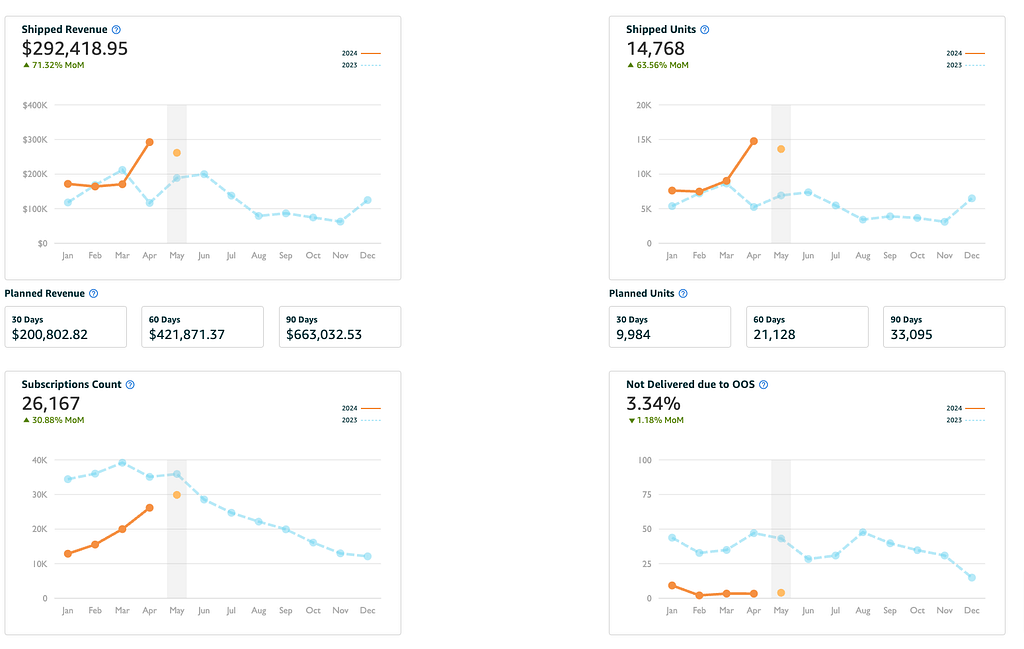
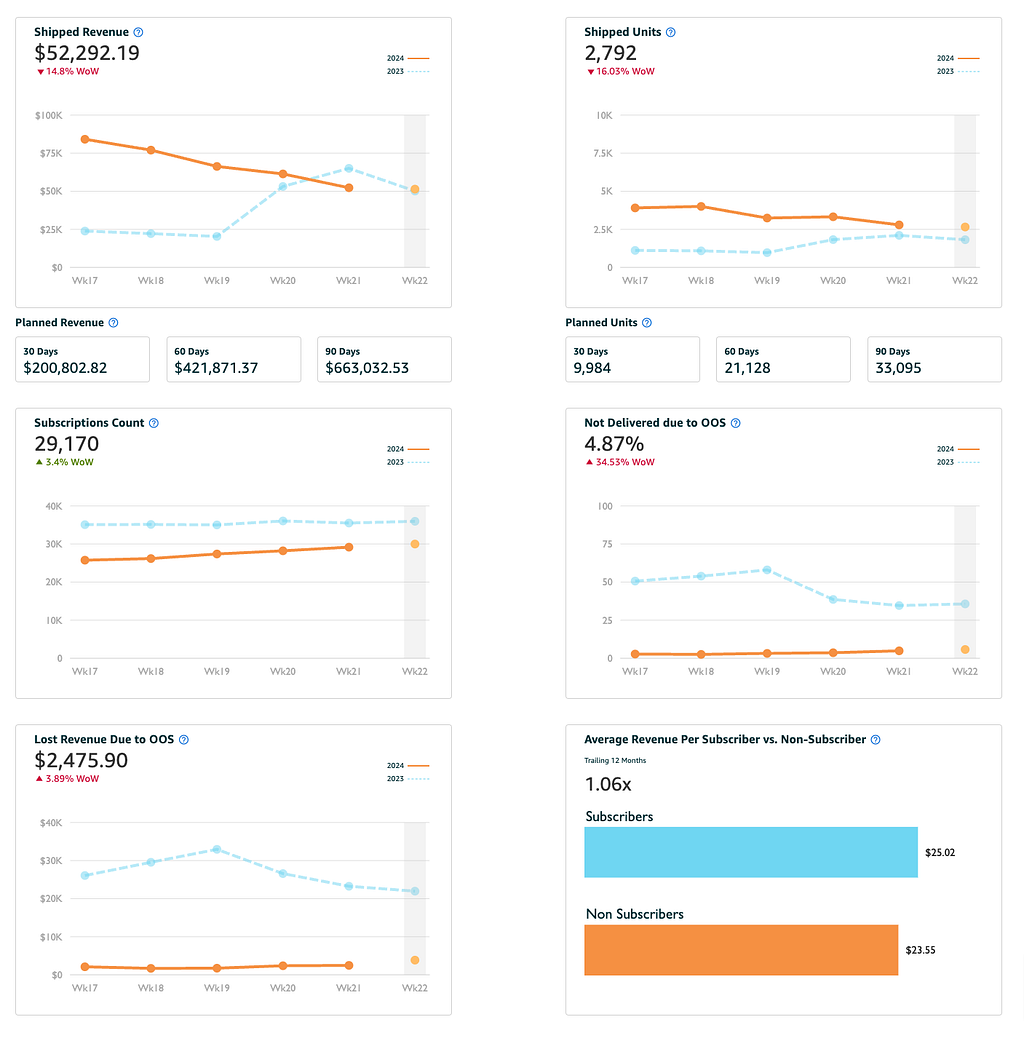
Subscribe and Save Dashboard

Combined, both are invaluable reports that empower you to maintain compliance with program terms, ensuring a consistent and reliable experience for your subscription customers. You can enhance your inventory management, pricing strategies, and overall sales performance by leveraging data insights.

The Value of Subscribe & Save Performance Reporting

So, what KPIs should you track in your Subscribe & Save Performance reporting, and how can that data help you improve?

Here are a few examples:

Subscription sales & revenue: Monitoring trends in your subscription units and revenue, both in aggregate and at the SKU level, is crucial to gauge the health of your program. You can identify top-performing products to double down on and spot issues like declining sales early on.

Inventory forecasting: The sns-units-shipped-week-X fields in the performance report show a trailing 4-week view of your subscription volume. Combined with the forecasting report that projects demand up to 8 weeks out, you can ensure you maintain optimal stock levels to avoid costly stockouts that disrupt the subscriber experience.

Discount & pricing optimization: The sns-discount-week-X and “sns-sale-price-week-X” columns allow you to track your effective discounting and pricing over time. Experiment with different discount levels to find the sweet spot that maximizes your subscription volume and profitability.

Out-of-stock rate: Keep a close eye on the “oos-rate-week-X” fields to monitor your in-stock rate. If you see an uptick in OOS, it’s time to adjust your inventory buffers. You can set alerts to automatically notify you if the OOS rate exceeds a certain threshold.

With metrics like these flowing automatically into a centralized data store, you can quickly slice and dice the numbers to uncover actionable opportunities to improve your Subscribe & Save performance.

Accessing the Data: Subscribe & Save Performance Report Schema

To set up your automated reporting, it’s helpful to understand the schema of the Subscribe & Save Performance Report. Here are the key fields:

  • snapshot-date: Report date
  • sku: Seller-defined SKU for the product
  • fnsku: Amazon-defined SKU for the product
  • asin: Amazon Standard Identification Number
  • product-name: Product title
  • week-X-start-date: Start date for the reporting week. Four weeks are included, with Week 1 being the most recent.
  • sns-units-shipped-week-X: Subscription units shipped in the given week
  • oos-rate-week-X: Out-of-stock rate for the week
  • sns-sale-price-week-X: Average sale price of subscription units for the week
  • sns-discount-week-X: Average discount on subscription orders for the week

Manual Reporting to Fully managed, Code-Free Automation

Manually downloading Subscribe & Save reports from Seller Central is time-consuming and prone to errors when merging data. By automating your reporting with Openbridge, you can:

  • Save hours spent on tedious data exports and get near real-time access to your metrics
  • Centralize your Subscribe & Save data alongside other datasets in a cloud data warehouse or data lake
  • Gain a reliable, unified view of your subscription sales to power holistic analytics
  • Easily feed data into BI tools like Tableau or Google Data Studio for powerful visualizations

With automated reporting, you’ll have the Subscribe & Save insights you need to make smarter decisions and drive better results, all while spending less time in data collection.

Dive Deeper into Amazon’s Reporting Data

The Subscribe and Save data is just the tip of the iceberg. Sellers eager to delve deeper can tap into many more Amazon performance and insights datasets:

Getting Started — Automate Today

Are you interested in tapping into your Subscribe and Save data? Get started so you can create data-driven insights fast.

Try our code-free, full-automated Amazon Subscribe and Save data integration today with a 30-day free trial!


Automating Amazon Subscribe and Save Performance Reporting was originally published in Openbridge on Medium, where people are continuing the conversation by highlighting and responding to this story.


from Openbridge - Medium https://ift.tt/KUTqA7B
via IFTTT

Automating Amazon Subscribe and Save Performance Reporting

Amazon Subscribe and Save Performance Reporting

The Amazon Subscribe & Save program offers a powerful way to drive recurring revenue, boost customer loyalty, and grow your business. But to maximize your results, you need timely, accurate, and comprehensive data to inform your strategies. That’s where automated Subscribe & Save performance reporting comes in.

What is the Amazon Subscribe and Save Performance Report?

The Amazon Subscribe & Save Performance Report offers a comprehensive four-week snapshot detailing items shipped, out-of-stock percentages, post-discount sale prices, and average discounts for each SKU.

For a forward-looking perspective, the Amazon Subscribe & Save Forecasting Report provides an eight-week sales forecast, enabling you to anticipate demand and plan accordingly.

Subscribe and Save Dashboard

Combined, both are invaluable reports that empower you to maintain compliance with program terms, ensuring a consistent and reliable experience for your subscription customers. You can enhance your inventory management, pricing strategies, and overall sales performance by leveraging data insights.

The Value of Subscribe & Save Performance Reporting

So, what KPIs should you track in your Subscribe & Save Performance reporting, and how can that data help you improve?

Here are a few examples:

Subscription sales & revenue: Monitoring trends in your subscription units and revenue, both in aggregate and at the SKU level, is crucial to gauge the health of your program. You can identify top-performing products to double down on and spot issues like declining sales early on.

Inventory forecasting: The sns-units-shipped-week-X fields in the performance report show a trailing 4-week view of your subscription volume. Combined with the forecasting report that projects demand up to 8 weeks out, you can ensure you maintain optimal stock levels to avoid costly stockouts that disrupt the subscriber experience.

Discount & pricing optimization: The sns-discount-week-X and “sns-sale-price-week-X” columns allow you to track your effective discounting and pricing over time. Experiment with different discount levels to find the sweet spot that maximizes your subscription volume and profitability.

Out-of-stock rate: Keep a close eye on the “oos-rate-week-X” fields to monitor your in-stock rate. If you see an uptick in OOS, it’s time to adjust your inventory buffers. You can set alerts to automatically notify you if the OOS rate exceeds a certain threshold.

With metrics like these flowing automatically into a centralized data store, you can quickly slice and dice the numbers to uncover actionable opportunities to improve your Subscribe & Save performance.

Accessing the Data: Subscribe & Save Performance Report Schema

To set up your automated reporting, it’s helpful to understand the schema of the Subscribe & Save Performance Report. Here are the key fields:

  • snapshot-date: Report date
  • sku: Seller-defined SKU for the product
  • fnsku: Amazon-defined SKU for the product
  • asin: Amazon Standard Identification Number
  • product-name: Product title
  • week-X-start-date: Start date for the reporting week. Four weeks are included, with Week 1 being the most recent.
  • sns-units-shipped-week-X: Subscription units shipped in the given week
  • oos-rate-week-X: Out-of-stock rate for the week
  • sns-sale-price-week-X: Average sale price of subscription units for the week
  • sns-discount-week-X: Average discount on subscription orders for the week

Manual Reporting to Fully managed, Code-Free Automation

Manually downloading Subscribe & Save reports from Seller Central is time-consuming and prone to errors when merging data. By automating your reporting with Openbridge, you can:

  • Save hours spent on tedious data exports and get near real-time access to your metrics
  • Centralize your Subscribe & Save data alongside other datasets in a cloud data warehouse or data lake
  • Gain a reliable, unified view of your subscription sales to power holistic analytics
  • Easily feed data into BI tools like Tableau or Google Data Studio for powerful visualizations

With automated reporting, you’ll have the Subscribe & Save insights you need to make smarter decisions and drive better results, all while spending less time in data collection.

Dive Deeper into Amazon’s Reporting Data

The Subscribe and Save data is just the tip of the iceberg. Sellers eager to delve deeper can tap into many more Amazon performance and insights datasets:

Getting Started — Automate Today

Are you interested in tapping into your Subscribe and Save data? Get started so you can create data-driven insights fast.

Try our code-free, full-automated Amazon Subscribe and Save data integration today with a 30-day free trial!


Automating Amazon Subscribe and Save Performance Reporting was originally published in Openbridge on Medium, where people are continuing the conversation by highlighting and responding to this story.


from Openbridge - Medium https://ift.tt/OtihNwm
via Openbridge

Breaking Barriers: Amazon Subscribe & Save For Breakthrough Growth

How to Boost Sales and Customer Loyalty with Amazon Subscribe And Save

Amazon Subscribe and Save is a powerful program that allows Amazon shoppers, including Prime members, to sign up for recurring, scheduled deliveries of items they use frequently and get Subscribe & Save deals for doing so.

The Subscribe & Save program can be an excellent way for Amazon sellers to drive consistent repeat purchases, encourage customer loyalty, and grow their business on Amazon. Enrolling a product in Subscribe & Save drives an average of 20% incremental revenue growth for that ASIN.

If you sell eligible products on Amazon and use Fulfillment by Amazon (FBA subscribe), it’s well worth understanding how Amazon’s Subscribe & Save program works and its benefits.

What is Amazon Subscribe & Save?

Amazon Subscribe & Save is a program that lets Amazon Prime members and all customers subscribe to recurring deliveries, from monthly to every 6 months, on thousands of eligible Subscribe & Save items. Shoppers get the convenience of automatic, regular delivery of essential products they use often, along with Subscribe & Save deals and discounts.

When customers have active subscriptions for 5 or more Subscribe & Save products arriving in the same delivery, they unlock a 15% discount on all their subscribed items. That’s on top of the 5–10% discount Amazon offers on each individual Subscribe & Save product. Amazon also frequently runs promotions offering coupons and extra discounts on the first Subscribe & Save order of select items.

The Subscribe & Save program helps turn one-time buyers into loyal, repeat customers for Amazon sellers. The deals and convenience motivate shoppers to keep their subscriptions active, driving consistent revenue for your Amazon business.

How the Subscribe & Save Program Works for Amazon Sellers

Here’s a quick overview of how Amazon’s Subscribe & Save program works from an Amazon seller perspective:

Eligibility: To participate, you must agree to the Subscribe & Save user agreement, have an FBA subscribe account in good standing, and meet certain performance requirements related to order defect rate, cancellation rate, and more. As of December 2019, new Subscribe & Save product enrollment is limited to brand owners.

Product enrollment: If your items meet the Subscribe & Save eligibility requirements, Amazon may choose to enroll them in the program, but it is not obligated to do so. You or Amazon can cancel a product’s enrollment at any time. Eligible, replenishable FBA subscribe items are often automatically enrolled.

Discounts: As an Amazon seller, you agree to fund an additional Subscribe & Save discount on top of what Amazon provides. Currently, sellers fund 5% off, and Amazon gives subscribers another 5% off for a 10% discount on subscriptions of 4 or fewer Subscribe & Save products. On 5 or more subscriptions arriving in the same Subscribe & Save order, Amazon kicks in an extra 5% savings for a total 15% discount.

Fulfillment: All Subscribe & Save orders for your products must be fulfilled through FBA subscribe. Participating in the Subscribe & Save program does not guarantee receiving subscription orders, as Amazon may allocate them to other sellers.

Inventory & performance: To meet customer expectations, your Subscribe & Save offers may be paused if you run out of inventory or have performance issues. It’s crucial to maintain healthy stock levels and strong Amazon seller metrics. Use the Subscribe & Save forecasting report in your Seller Central account to plan inventory and avoid missing Subscribe & Save order deliveries.

Cancellations & Subscription Settings: Customers can adjust their subscription settings or cancel anytime. If your offer becomes unavailable for 14+ days, Amazon will automatically attempt to transfer the subscriptions to another seller with an identical Subscribe & Save offer.

Amazon Subscribe & Save Benefits for Sellers

Increase repeat sales: Subscribe & Save turns one-time Amazon shoppers into repeat customers, driving consistent revenue as people keep their subscriptions active to save time and access Subscribe & Save deals.

Build customer loyalty: The Subscribe & Save program creates a recurring, positive experience with your products that encourages long-term loyalty and higher lifetime value per Amazon customer.

Gain incremental revenue: Many Subscribe & Save customers purchase items they would not have bought as frequently, leading to incremental sales and revenue.

Improve search rankings: Increased sales velocity from Subscribe & Save orders can help boost your products’ search rankings and organic visibility on Amazon. Consider using Amazon Advertising, such as Sponsored Product ads, to drive more traffic to your Subscribe & Save listings.

Cross-sell and up-sell: The Subscribe & Save storefront exposes shoppers to related items they can add to their subscriptions, providing cross-sell opportunities. You can also up-sell customers to larger pack sizes that offer better unit economics with the Subscribe & Save discount.

Amazon Seller Success Stories

Here’s what Amazon sellers are saying about their success with the Subscribe & Save program:

“It’s really just a no-brainer. You’ll get more sales. You’ll get repeat customers.” — Schwartz Bioresearch, Health & Household category.

After joining Subscribe & Save, Schwartz Bioresearch saw repeat customers jump from 10% to 30%. “The strongest benefit is customer loyalty. We get repeat customers with minimal investment.”

“It’s business you can count on.” — Puracy, Health & Household category

Subscribe & Save grew to 20% of Puracy’s Amazon sales in one year. The company says the program lowered acquisition costs, provided predictable revenue, and expanded brand reach.

“It’s really convenient for consumers.” — Vital Proteins, Health & Household category

Vital Proteins loves how Subscribe & Save benefits their Amazon customers.

“People are increasingly busy. Subscribe & Save is convenient, and they don’t have to remember to reorder.”

Tips to Maximize Your Subscribe & Save Sales

Choose the right products: Focus on items Amazon shoppers buy regularly that are a good fit for subscriptions — consumables, household essentials, pet supplies, office products, personal care, etc.

Promote your offers: Advertise your Subscribe & Save deals on and off Amazon. On Amazon, run Sponsored Product ads and coupons targeted to your offers. Outside Amazon, use email, social media, and other channels to highlight the value of Subscribe & Save.

Constantly monitor performance: Use the Subscribe & Save sales and forecast reports in Seller Central to track key metrics like subscription sales, inventory levels, etc. Regularly audit your Amazon account health to avoid disruptions to Subscribe & Save offers.

Manage your inventory wisely: Accurately forecast demand and maintain sufficient FBA inventory to cover your projected subscription orders and regular deliveries. To inform your planning, the Subscribe & Save forecast report shows estimated sales for the next 8 weeks.

Be a Data-Driven Subscribe & Save Seller

To optimize Subscribe & Save performance, tracking key sales and inventory KPIs is critical. There are two primary reporting datasets to fuel program insights;

  • Subscribe & Save Performance Report: This report tracks the performance of various products enrolled in the Subscribe & Save program. Key metrics include units shipped, out-of-stock rates, sale prices, and discounts over multiple weeks. Understanding these metrics helps businesses monitor the effectiveness of their Subscribe & Save offerings, ensuring that products are always in stock and priced competitively.
  • Subscribe & Save Forecasting Report: This report forecasts the number of units scheduled for shipment in the coming weeks for products in the Subscribe & Save program. It includes data on active subscriptions and scheduled units over eight weeks. Accurate forecasting allows for better inventory planning and ensures customer demand is met without overstocking.

Both reports are crucial for effectively managing the Subscribe & Save program, driving customer satisfaction through reliable deliveries, and optimizing inventory and promotional strategies to foster growth.

You can access this data manually in the Subscribe & Save reports in your Seller Central account:

  1. Log into Seller Central
  2. Go to Reports > Fulfillment > Subscribe & Save
  3. Download the Sales Diagnostics report for detailed subscription sales and units by SKU and period
  4. Get the Forecast report to see estimated upcoming subscription sales for the next 2 months

However, manually downloading Subscribe & Save reports is tedious, especially if you need to analyze the data alongside metrics from your other sales channels frequently. Manual exports are also prone to errors when merging data.

Automating your Subscribe & Save data feeds

Automation allows for fast, centralized access and saves hours versus manual reporting. With Openbridge, you can automatically pull Subscribe & Save sales and forecast data into a cloud data warehouse like Redshift, Snowflake, BigQuery, or Azure to combine with your other datasets.

A data warehouse gives you a reliable source of truth to power holistic analytics without manual data wrangling. Openbridge has plug-and-play data connectors to sync Subscribe & Save data to leading cloud data warehouses.

With unified Subscribe & Save metrics in your data warehouse, you can make smarter decisions to optimize your strategy and performance. Openbridge makes it simple to feed this data into BI tools like Tableau, Data Studio, or Power BI for powerful reporting.

Getting Started with Subscribe & Save Data-Driven Insights

Ready to streamline your Subscribe & Save reporting? Automated data feeds provide the insights to improve your Subscribe & Save performance. Leverage the data to increase retention, optimize inventory, and grow your Amazon sales.

Openbridge seamlessly delivers Subscribe & Save data to your cloud data warehouse or data lake, creating an analytics-ready single source of truth to guide decisions that maximize your subscription sales. Easily connect the data to your BI tools to spot trends and opportunities.

Openridge supports a broad collection of feeds for data-driven Amazon analytics. If you are an Amazon Seller or Amazon Vendor, Amazon Advertising offers a collection of data feeds to assist with broader store insight efforts:

In addition to Amazon Ads data, there is a broad collection of retail information available to assist with your analysis efforts:

Start today — it’s easy.

Everything you need to quickly unify your data, streamline processes, and supercharge insights that deliver data-driven growth. Take control and own your data with code-free automation to Amazon API data.

> Sign up for a 30-day free trial for direct, code-free access to Amazon Subscribe and Save Insights Data.


Breaking Barriers: Amazon Subscribe & Save For Breakthrough Growth was originally published in Openbridge on Medium, where people are continuing the conversation by highlighting and responding to this story.


from Openbridge - Medium https://ift.tt/Sv4gqsc
via IFTTT

Breaking Barriers: Amazon Subscribe & Save For Breakthrough Growth

How to Boost Sales and Customer Loyalty with Amazon Subscribe And Save

Amazon Subscribe and Save is a powerful program that allows Amazon shoppers, including Prime members, to sign up for recurring, scheduled deliveries of items they use frequently and get Subscribe & Save deals for doing so.

The Subscribe & Save program can be an excellent way for Amazon sellers to drive consistent repeat purchases, encourage customer loyalty, and grow their business on Amazon. Enrolling a product in Subscribe & Save drives an average of 20% incremental revenue growth for that ASIN.

If you sell eligible products on Amazon and use Fulfillment by Amazon (FBA subscribe), it’s well worth understanding how Amazon’s Subscribe & Save program works and its benefits.

What is Amazon Subscribe & Save?

Amazon Subscribe & Save is a program that lets Amazon Prime members and all customers subscribe to recurring deliveries, from monthly to every 6 months, on thousands of eligible Subscribe & Save items. Shoppers get the convenience of automatic, regular delivery of essential products they use often, along with Subscribe & Save deals and discounts.

When customers have active subscriptions for 5 or more Subscribe & Save products arriving in the same delivery, they unlock a 15% discount on all their subscribed items. That’s on top of the 5–10% discount Amazon offers on each individual Subscribe & Save product. Amazon also frequently runs promotions offering coupons and extra discounts on the first Subscribe & Save order of select items.

The Subscribe & Save program helps turn one-time buyers into loyal, repeat customers for Amazon sellers. The deals and convenience motivate shoppers to keep their subscriptions active, driving consistent revenue for your Amazon business.

How the Subscribe & Save Program Works for Amazon Sellers

Here’s a quick overview of how Amazon’s Subscribe & Save program works from an Amazon seller perspective:

Eligibility: To participate, you must agree to the Subscribe & Save user agreement, have an FBA subscribe account in good standing, and meet certain performance requirements related to order defect rate, cancellation rate, and more. As of December 2019, new Subscribe & Save product enrollment is limited to brand owners.

Product enrollment: If your items meet the Subscribe & Save eligibility requirements, Amazon may choose to enroll them in the program, but it is not obligated to do so. You or Amazon can cancel a product’s enrollment at any time. Eligible, replenishable FBA subscribe items are often automatically enrolled.

Discounts: As an Amazon seller, you agree to fund an additional Subscribe & Save discount on top of what Amazon provides. Currently, sellers fund 5% off, and Amazon gives subscribers another 5% off for a 10% discount on subscriptions of 4 or fewer Subscribe & Save products. On 5 or more subscriptions arriving in the same Subscribe & Save order, Amazon kicks in an extra 5% savings for a total 15% discount.

Fulfillment: All Subscribe & Save orders for your products must be fulfilled through FBA subscribe. Participating in the Subscribe & Save program does not guarantee receiving subscription orders, as Amazon may allocate them to other sellers.

Inventory & performance: To meet customer expectations, your Subscribe & Save offers may be paused if you run out of inventory or have performance issues. It’s crucial to maintain healthy stock levels and strong Amazon seller metrics. Use the Subscribe & Save forecasting report in your Seller Central account to plan inventory and avoid missing Subscribe & Save order deliveries.

Cancellations & Subscription Settings: Customers can adjust their subscription settings or cancel anytime. If your offer becomes unavailable for 14+ days, Amazon will automatically attempt to transfer the subscriptions to another seller with an identical Subscribe & Save offer.

Amazon Subscribe & Save Benefits for Sellers

Increase repeat sales: Subscribe & Save turns one-time Amazon shoppers into repeat customers, driving consistent revenue as people keep their subscriptions active to save time and access Subscribe & Save deals.

Build customer loyalty: The Subscribe & Save program creates a recurring, positive experience with your products that encourages long-term loyalty and higher lifetime value per Amazon customer.

Gain incremental revenue: Many Subscribe & Save customers purchase items they would not have bought as frequently, leading to incremental sales and revenue.

Improve search rankings: Increased sales velocity from Subscribe & Save orders can help boost your products’ search rankings and organic visibility on Amazon. Consider using Amazon Advertising, such as Sponsored Product ads, to drive more traffic to your Subscribe & Save listings.

Cross-sell and up-sell: The Subscribe & Save storefront exposes shoppers to related items they can add to their subscriptions, providing cross-sell opportunities. You can also up-sell customers to larger pack sizes that offer better unit economics with the Subscribe & Save discount.

Amazon Seller Success Stories

Here’s what Amazon sellers are saying about their success with the Subscribe & Save program:

“It’s really just a no-brainer. You’ll get more sales. You’ll get repeat customers.” — Schwartz Bioresearch, Health & Household category.

After joining Subscribe & Save, Schwartz Bioresearch saw repeat customers jump from 10% to 30%. “The strongest benefit is customer loyalty. We get repeat customers with minimal investment.”

“It’s business you can count on.” — Puracy, Health & Household category

Subscribe & Save grew to 20% of Puracy’s Amazon sales in one year. The company says the program lowered acquisition costs, provided predictable revenue, and expanded brand reach.

“It’s really convenient for consumers.” — Vital Proteins, Health & Household category

Vital Proteins loves how Subscribe & Save benefits their Amazon customers.

“People are increasingly busy. Subscribe & Save is convenient, and they don’t have to remember to reorder.”

Tips to Maximize Your Subscribe & Save Sales

Choose the right products: Focus on items Amazon shoppers buy regularly that are a good fit for subscriptions — consumables, household essentials, pet supplies, office products, personal care, etc.

Promote your offers: Advertise your Subscribe & Save deals on and off Amazon. On Amazon, run Sponsored Product ads and coupons targeted to your offers. Outside Amazon, use email, social media, and other channels to highlight the value of Subscribe & Save.

Constantly monitor performance: Use the Subscribe & Save sales and forecast reports in Seller Central to track key metrics like subscription sales, inventory levels, etc. Regularly audit your Amazon account health to avoid disruptions to Subscribe & Save offers.

Manage your inventory wisely: Accurately forecast demand and maintain sufficient FBA inventory to cover your projected subscription orders and regular deliveries. To inform your planning, the Subscribe & Save forecast report shows estimated sales for the next 8 weeks.

Be a Data-Driven Subscribe & Save Seller

To optimize Subscribe & Save performance, tracking key sales and inventory KPIs is critical. There are two primary reporting datasets to fuel program insights;

  • Subscribe & Save Performance Report: This report tracks the performance of various products enrolled in the Subscribe & Save program. Key metrics include units shipped, out-of-stock rates, sale prices, and discounts over multiple weeks. Understanding these metrics helps businesses monitor the effectiveness of their Subscribe & Save offerings, ensuring that products are always in stock and priced competitively.
  • Subscribe & Save Forecasting Report: This report forecasts the number of units scheduled for shipment in the coming weeks for products in the Subscribe & Save program. It includes data on active subscriptions and scheduled units over eight weeks. Accurate forecasting allows for better inventory planning and ensures customer demand is met without overstocking.

Both reports are crucial for effectively managing the Subscribe & Save program, driving customer satisfaction through reliable deliveries, and optimizing inventory and promotional strategies to foster growth.

You can access this data manually in the Subscribe & Save reports in your Seller Central account:

  1. Log into Seller Central
  2. Go to Reports > Fulfillment > Subscribe & Save
  3. Download the Sales Diagnostics report for detailed subscription sales and units by SKU and period
  4. Get the Forecast report to see estimated upcoming subscription sales for the next 2 months

However, manually downloading Subscribe & Save reports is tedious, especially if you need to analyze the data alongside metrics from your other sales channels frequently. Manual exports are also prone to errors when merging data.

Automating your Subscribe & Save data feeds

Automation allows for fast, centralized access and saves hours versus manual reporting. With Openbridge, you can automatically pull Subscribe & Save sales and forecast data into a cloud data warehouse like Redshift, Snowflake, BigQuery, or Azure to combine with your other datasets.

A data warehouse gives you a reliable source of truth to power holistic analytics without manual data wrangling. Openbridge has plug-and-play data connectors to sync Subscribe & Save data to leading cloud data warehouses.

With unified Subscribe & Save metrics in your data warehouse, you can make smarter decisions to optimize your strategy and performance. Openbridge makes it simple to feed this data into BI tools like Tableau, Data Studio, or Power BI for powerful reporting.

Getting Started with Subscribe & Save Data-Driven Insights

Ready to streamline your Subscribe & Save reporting? Automated data feeds provide the insights to improve your Subscribe & Save performance. Leverage the data to increase retention, optimize inventory, and grow your Amazon sales.

Openbridge seamlessly delivers Subscribe & Save data to your cloud data warehouse or data lake, creating an analytics-ready single source of truth to guide decisions that maximize your subscription sales. Easily connect the data to your BI tools to spot trends and opportunities.

Openridge supports a broad collection of feeds for data-driven Amazon analytics. If you are an Amazon Seller or Amazon Vendor, Amazon Advertising offers a collection of data feeds to assist with broader store insight efforts:

In addition to Amazon Ads data, there is a broad collection of retail information available to assist with your analysis efforts:

Start today — it’s easy.

Everything you need to quickly unify your data, streamline processes, and supercharge insights that deliver data-driven growth. Take control and own your data with code-free automation to Amazon API data.

> Sign up for a 30-day free trial for direct, code-free access to Amazon Subscribe and Save Insights Data.


Breaking Barriers: Amazon Subscribe & Save For Breakthrough Growth was originally published in Openbridge on Medium, where people are continuing the conversation by highlighting and responding to this story.


from Openbridge - Medium https://ift.tt/rl1npvg
via Openbridge